Robotic Studio — a robot from mission to machine
Open Robotic Studio →Say what a robot should do, and this studio takes it the whole way: requirements with metrics and thresholds, a bill of materials of real parts, printable geometry, a checked wiring loom, a software stack, a simulation — and then the part that separates it from every "AI robot designer": bring-up, logged trials and a validation packet backed by tests somebody actually ran. Its governing rule is that it never flatters you. The model picks kinds of things and is never allowed to assert a figure; every number is computed from the parts you chose and shows its formula; and a requirement is met only when the evidence says so.
Walkthrough: one sentence to a validated machine
Ten stages, and three of them wait for you
Mission, architecture, parts, mechanics, electronics, software, simulation, bring-up, trials, validation. Each is gated by the one before it, so you never pay for a render before the thing it depends on is settled.
Three stages carry a manual badge: bring-up, trials and validation. The "run every step automatically" switch — which every other studio in Grafy obeys completely — deliberately does not reach them. Those steps move a real machine, and nothing here will approve that on your behalf.
The right-hand column stays live the whole way down: Analysis recomputes from the current bill of materials, and Open questions lists what is still unanswered instead of hiding it.
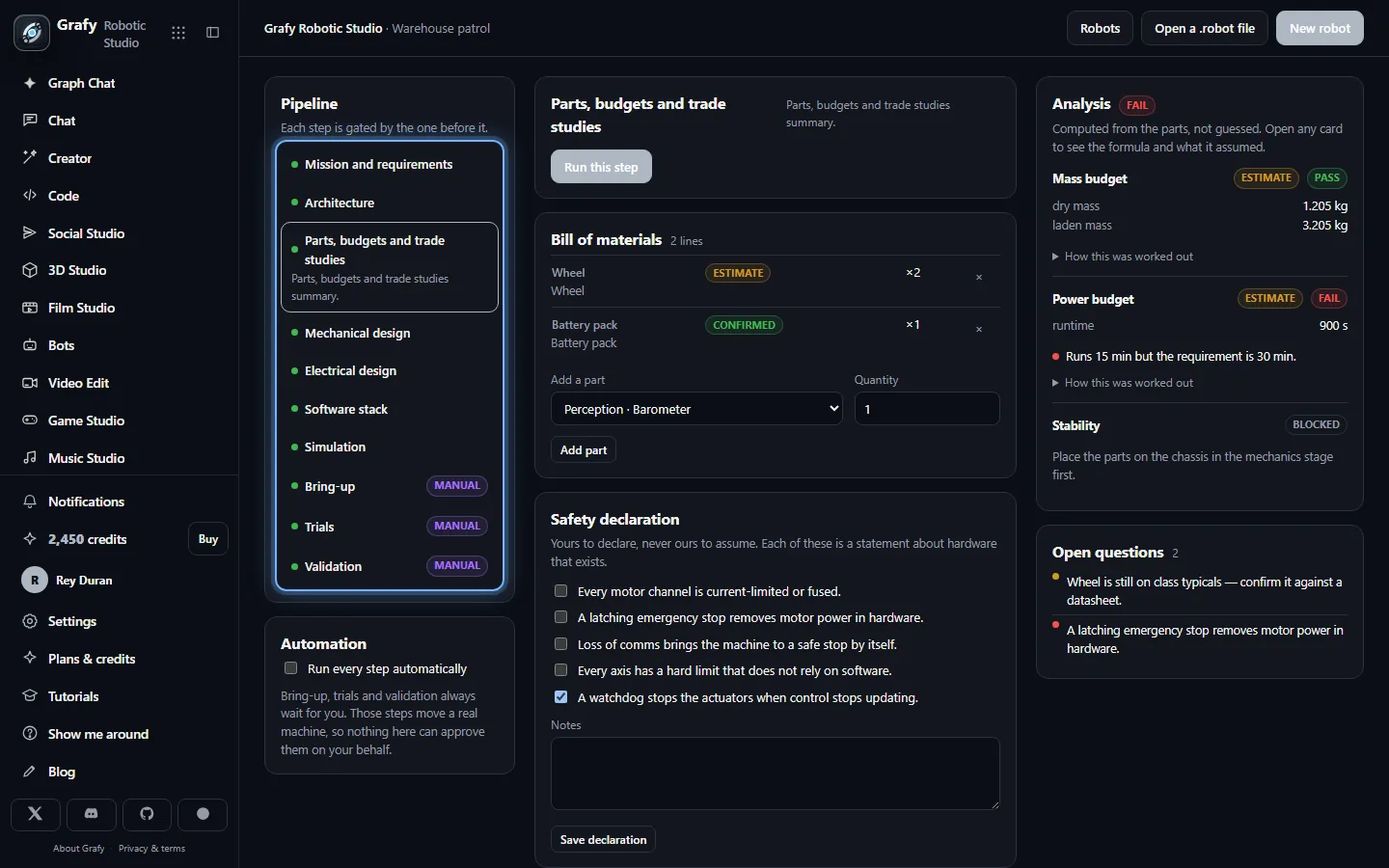
Say what it must do, then write requirements
Describe the mission the way you would say it out loud — what the robot does, where it works, how it is operated, what it carries and how hard it works. Then write the requirements it will be judged on.
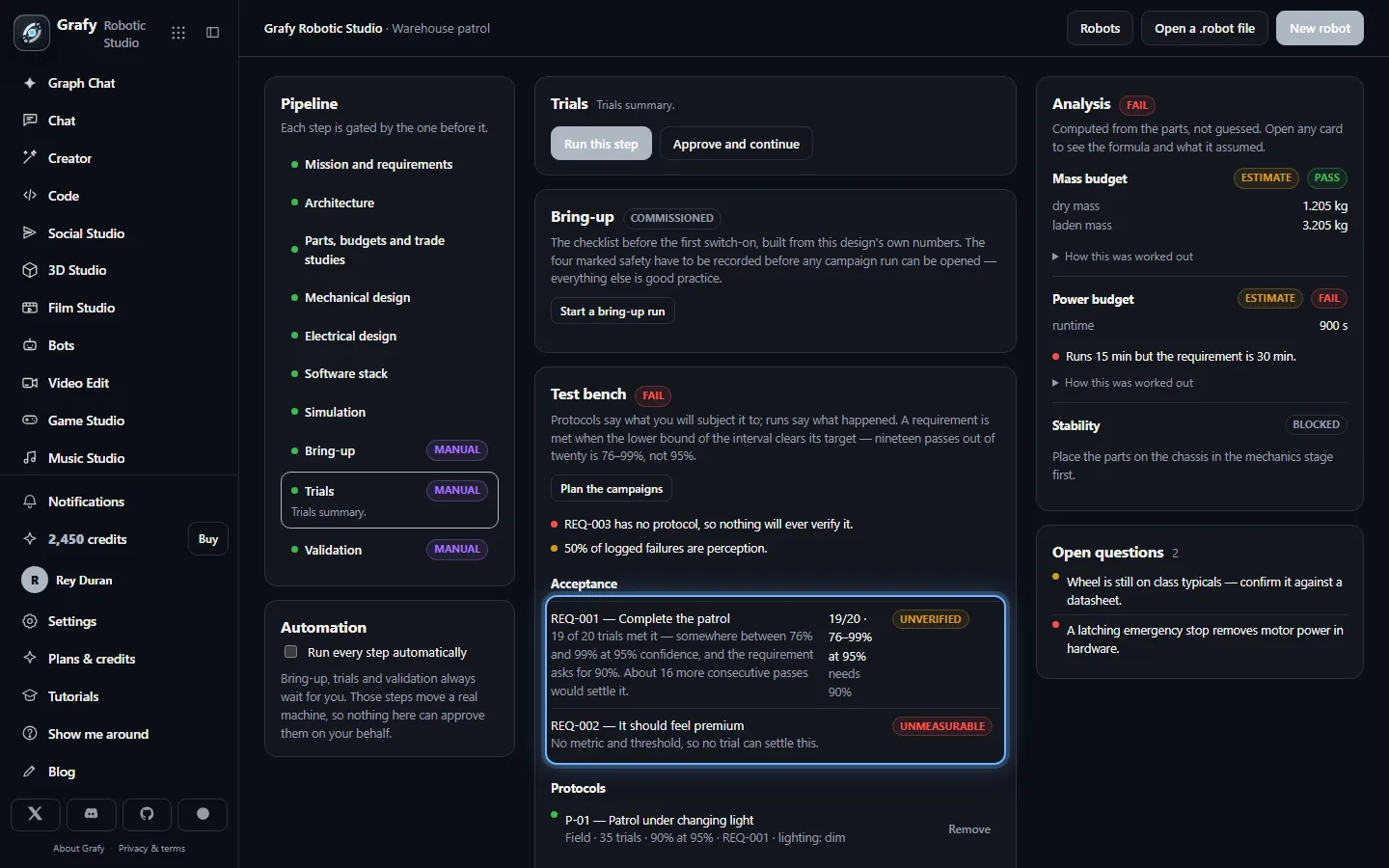
A requirement needs a metric and a threshold. "It should feel premium" is marked unmeasurable on the spot, and at the test bench it says plainly that no trial can settle this.
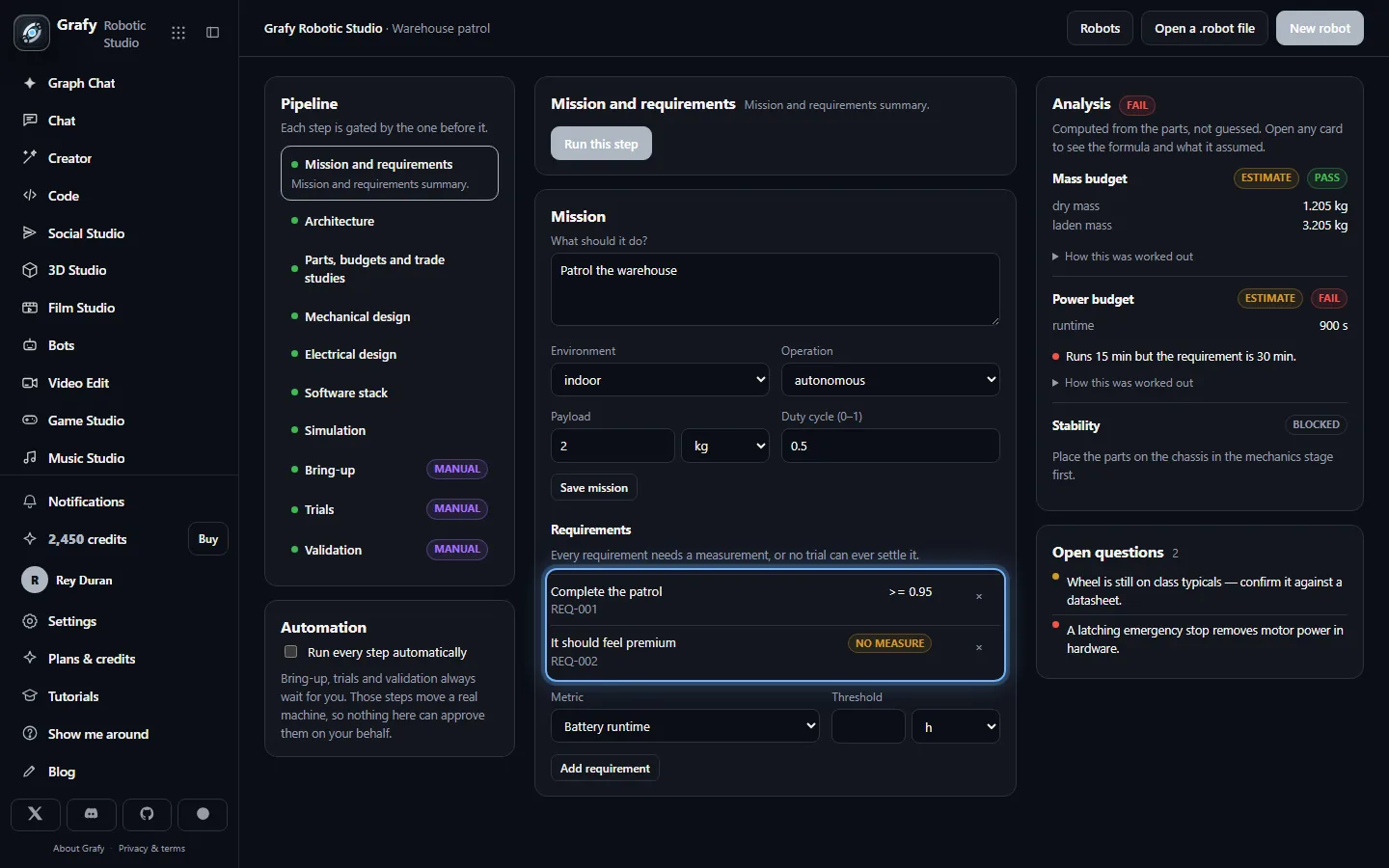
Choose parts — then confirm the ones you will build with
You add a class of part — a wheel, a gearmotor, a battery pack — and the catalog fills in typical figures for that class so the calculators have something to work with. Every such part is tagged estimate; reading the real numbers off the datasheet in front of you turns it confirmed.
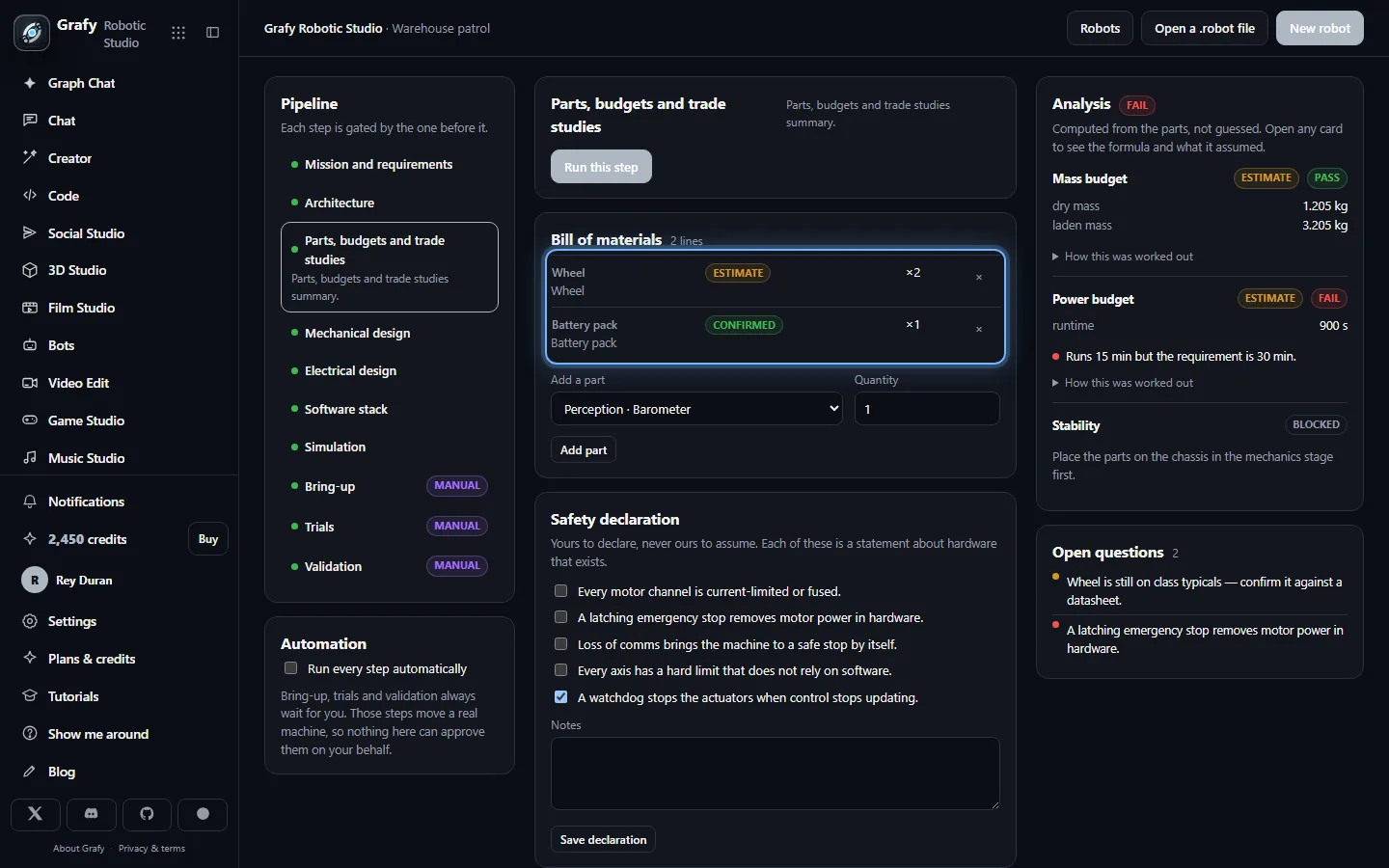
Read the numbers, including the ones that disagree
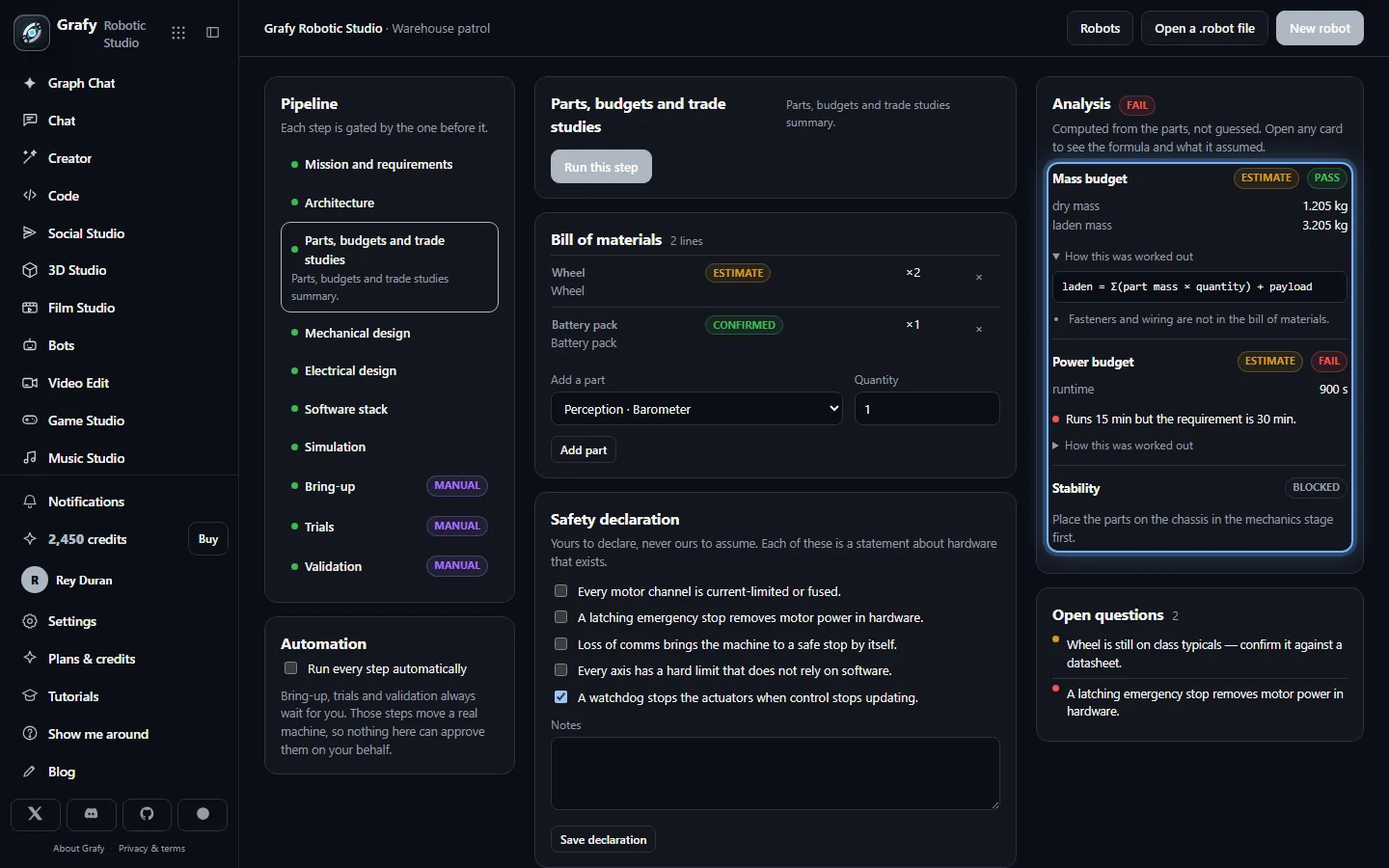
Mass budget, power budget, drive sizing, stability. Open any card and it shows the formula it used and the assumptions it made. The card in this shot reports 15 minutes of runtime against a 30-minute requirement, and it reports it as a fail. A calculator that only ever agreed with you would be decoration.
Wire it, under rules that refuse
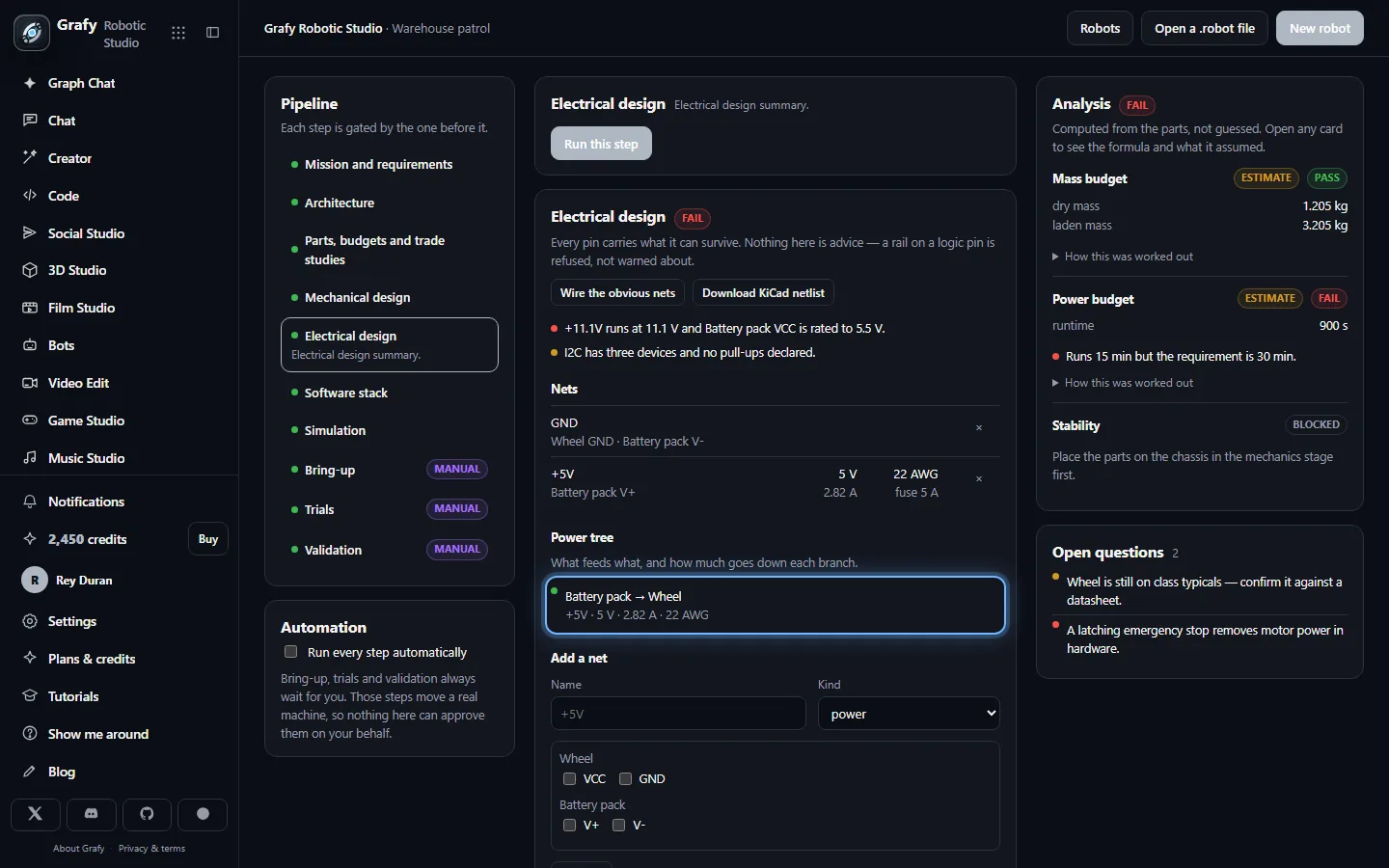
Nets, rails, a power tree and wire gauges from published ampacity tables, derated for a loom. Pin ratings come off each part's own spec sheet, so the check sharpens as parts are confirmed — and the errors here are refusals, not advice.
Plan the software, and seed a real project
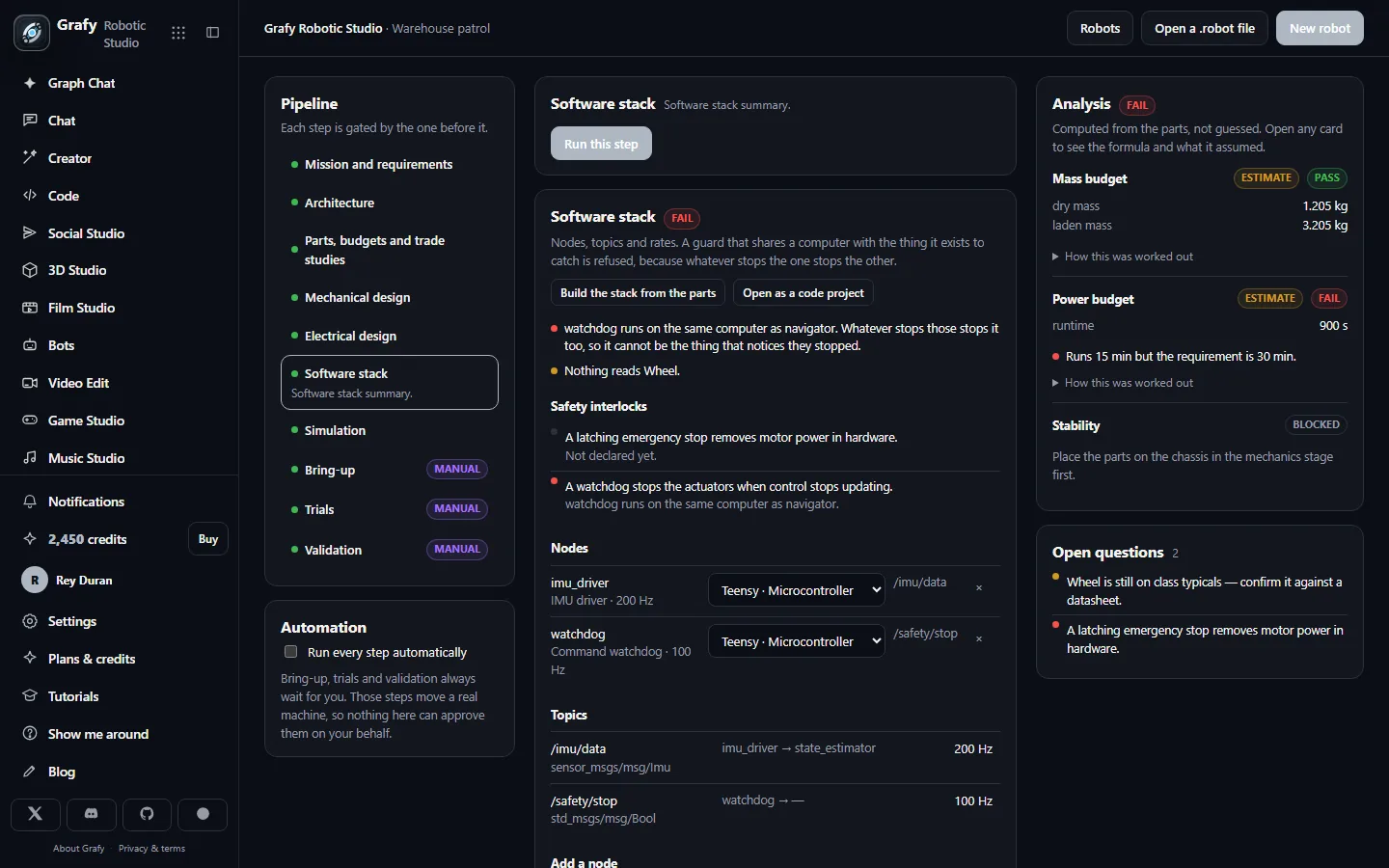
Nodes, topics and rates with real ROS 2 message types, and sensor rates taken from the datasheets. Open as a code project seeds a Grafy Code project with the whole stack: drivers as skeletons, and the watchdog and failsafe written out in full, failing closed.
Run trials, and let the statistics decide
Protocols say what you will subject the machine to; runs say what happened. Trials are logged by hand, imported from a CSV with units in the cells, or posted by the robot itself to a one-way telemetry endpoint. Acceptance is then arithmetic, not opinion.
Compose the packet that ships with the machine
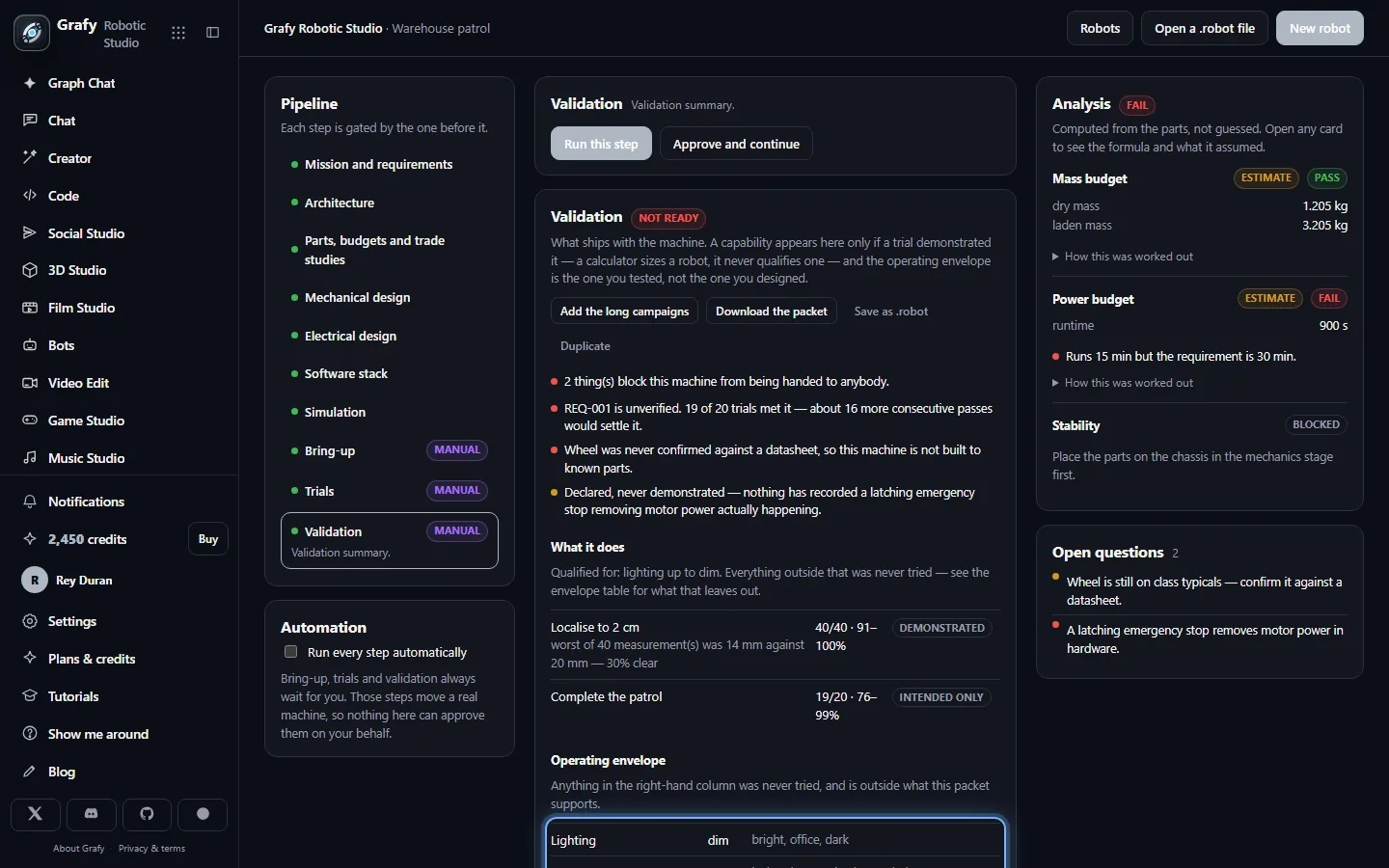
A datasheet, an operating envelope, a safety case, a maintenance schedule, a spares list and a written residual-risk section — assembled from the design and the evidence, and honest about the difference between them.
Requirements that can be settled
A requirement carries an id, a metric, a threshold and a priority, and the priority is not decoration: it sets the confidence a trial campaign has to reach before the requirement counts as met.
Anything without a metric and a threshold is marked unmeasurable immediately, and stays that way through every later stage. That is not pedantry. An unmeasurable requirement is one nobody can ever be held to, and the cheapest possible moment to discover it is the day it was written — not at handover, when it becomes an argument.
The right-hand Open questions column is the other half of the same idea: when the design needs a decision nobody has made, it is listed as an open question rather than quietly defaulted. Gaps work the same way at the parts stage — when the model wants something the catalog does not carry, it opens a named hole with the specifications the design needs, and that hole blocks the stage until you fill it from a datasheet.
Estimate versus confirmed
The distinction runs through the entire app, and it comes down to one sentence:
You may design on estimates. You may not build on them.
Class typicals are exactly right for sizing: they let you check a chassis before any part has been ordered. They are not right for switching a machine on, so bring-up refuses to start until every part is confirmed and carries a part number — a robot built from typical values is a robot nobody can order twice. A part missing a figure the geometry or the wiring actually needs blocks earlier than that, because those stages cannot be computed without it.
The same discipline applies to evidence over time. Every trial cites the design revision it ran against, and the revisions are immutable. Change the drive motors and every drive-performance trial goes stale — saying which change did it — while the perception trials are untouched. Without that, the app would become a machine for showing last month's passing grade on this month's robot.
Numbers that show their working
Every physical figure in the app is computed by a deterministic function from the parts you chose: power budget, torque and gear ratio, battery runtime, centre of mass, tip-over margin, wire ampacity, voltage drop, fuse sizing, thermal headroom, first-order beam deflection. The model never states a number, because a hallucinated 4.2 N·m is not a bad sentence — it is a machine that cannot lift its own arm.
Each card expands to its formula and its assumptions — that fasteners are not in the bill of materials, that every rail is treated as loaded at once, that the reach is worst-case and static with a 1.5× safety factor. An unqualified number invites trust nobody has earned; a number with its assumptions under it is an engineering claim you can argue with.
Cards can also come back blocked. Stability needs the parts placed on the chassis first, so it names the stage to go and do rather than inventing a centre of mass. And every physical field is a typed quantity — a value with a unit — so no calculator ever sees a number whose unit it has to guess.
Printable parts, cut from the parts you chose
The mechanics stage builds real geometry: chassis plates, brackets and mounts, cut from each component's own dimensions and bolt pattern, and exported as STL. Mounting dimensions — bolt circle, bolt count, bolt diameter, boss diameter — are optional on a part and mandatory to cut one, so they never block the parts stage, and when a generator needs one the studio asks for exactly that figure instead of failing.
There is one honest limitation, and the app states it rather than working around it: a through-hole can only run along the extrusion axis. Parts here are plates and bodies of revolution. An L-bracket with bolt holes in both legs is refused outright — that is two parts fastened together, or a job for the 3D Studio, which is one click away and hands a finished mesh back.
The placed parts are also what makes stability computable: centre of mass and tip-over margin come from where things actually sit on the chassis, which is why the stability card stays blocked until they do.
Electrical rules that refuse
This stage does not offer advice. A supply rail on a logic pin, two supplies tied together, wire thinner than its current, a fuse that would let the wire become the fuse, an unterminated CAN bus, power without ground — each is refused.
Behind the check is a small circuit model rather than a table of nets, because the two nets that matter most in a robot have no ratings of their own. Voltage propagates forward from a source through the devices that hand a supply on; current propagates backward from the loads. Checked net-by-net instead, switched motor power and a driver's outputs would come out with no voltage and no current on them and be silently skipped — the exact opposite of where the attention belongs. Three consequences fall out of that model, each of which was a wrong number first: a pass-through's declared voltage is what it can survive, not what it delivers; an emergency stop's 10 A contact rating is a rating, not a draw; and a part draws its current once however many of its pins sit on the net — if both terminals of a motor really are on one net, that is a short, and it is reported as one.
The wiring suggester holds exactly one topology opinion, and it is a safety one: the pack goes to the emergency stop and the stop goes to the drivers, in series, because that is what makes the stop cut motor power in hardware and keep working when the software is the thing that failed. Everything else it declines to guess — which driver channel drives which motor is a decision, and a wrong guess there is worse than an empty table.
The software stack, and the guard that may not share a computer
Nodes, topics, rates and real ROS 2 message types, with sensor rates read from the datasheets of the parts you actually chose. Open as a code project seeds a Grafy Code project with the whole stack — drivers as skeletons to fill in, and the watchdog and failsafe written out in full, failing closed.
The refusal that matters here: a watchdog or comms failsafe running on the same computer as the stack it guards is reported as a failure. Whatever stops one stops the other, so on a single-computer robot that guard is decoration. Two publishers on a command topic is refused too, and deliberately not tidied away by namespacing them apart.
The simulation stage composes URDF, SDF and MJCF from the same document, with inertias taken from the real printed meshes at their real mass — so what you simulate is the robot you drew, not a stand-in for it.
Trials, statistics and acceptance
Bring-up is a power-on checklist, calibration and instrumentation. Trials are campaigns: a protocol, a layer, an operator, an environment and one row per attempt with its outcome, metrics and failure category. Log them by hand, import a CSV with units in the cells, or let the robot post them to a one-way telemetry endpoint.
Then the arithmetic the rest of the app exists to protect:
Nineteen passes out of twenty is not 95%. The Wilson interval on it runs 76–99%, so a requirement is met only when the lower bound clears the target its priority sets. An acceptance row can read 19 of 20 met and still say unverified — and it also says how many more consecutive passes would settle it, because a refusal with no route through it is one people learn to route around.
Two rules keep the evidence worth having. A simulation never closes
a requirement: it tests the model, and the model came out of the same
design as the robot, so mission-level metrics need field evidence. And an
excluded trial has to say why — invalid is the only
outcome that leaves the denominator, and one with an empty note is stored
as a failure. There is no way to delete a trial at all.
One thing this app deliberately cannot do: command hardware. Telemetry is inbound only. There is no actuation endpoint, no teleop and no "run this trajectory" button, and there will not be one — a web app over the public internet cannot offer the latency guarantees, interlocks and dead-man behaviour that moving a machine requires.
Validation, and the envelope you actually tested
The last stage composes what ships with the machine: a datasheet, an operating envelope, a safety case, a maintenance schedule, a spares list and a written residual-risk section. It holds one opinion above all others:
The operating envelope is the envelope you tested, not the one you designed.
It reads the stimulus levels that actually appear in runs with counted trials, and names every level of the vocabulary that does not. A robot whose drive calculator says it climbs 20° but whose every trial ran on level ground is qualified for level ground, and the packet says so in writing.
Two rules follow. A capability reaches the datasheet only if a requirement covering it is verified — a calculator sizes a machine, it never qualifies one. And a declared interlock with no bring-up trial that fired it is listed as a hole in the safety case rather than quietly left out.
What you take away
A .robot bundle — the design and its evidence, including the design revisions each run cites, so an imported result is never stale by accident. Printable parts as STL. A KiCad netlist, and a placed, netted, DRC-able carrier board project whose outline and mounting holes come from the chassis plate in the same document — the board fits the robot because they are one design. Nothing is autorouted: generated routing always needs checking by somebody who could have routed it themselves. A URDF/SDF/MJCF simulation. And a share link that shows the validation packet and nothing else — sending somebody proof that a machine works does not hand them your bill of materials, your wiring or the brief it was built from.
A caveat the app makes too, and means: Grafy has no KiCad, no printer and no robot attached to it. Emitted files are checked structurally, and the calculators size a first prototype rather than replacing an FEA run. The first real validation happens on hardware you own — which is precisely why the test bench, and not the generator, is the centre of this app.