WordInferBench tests AI agents on inferring Word formatting
A new benchmark, WordInferBench, challenges AI agents to infer formatting changes from Word document context.
 Source: Grafy Research Lab
What is WordInferBench and why it matters?
WordInferBench is a newly released benchmark that measures how well autonomous AI agents can infer the correct formatting changes in a Microsoft Word document from the surrounding context, rather than relying on fully specified instructions. According to the paper published on arXiv, this capability is essential for real‑world editing where users expect new objects to automatically match existing styles without spelling out every attribute.
How was the benchmark constructed?
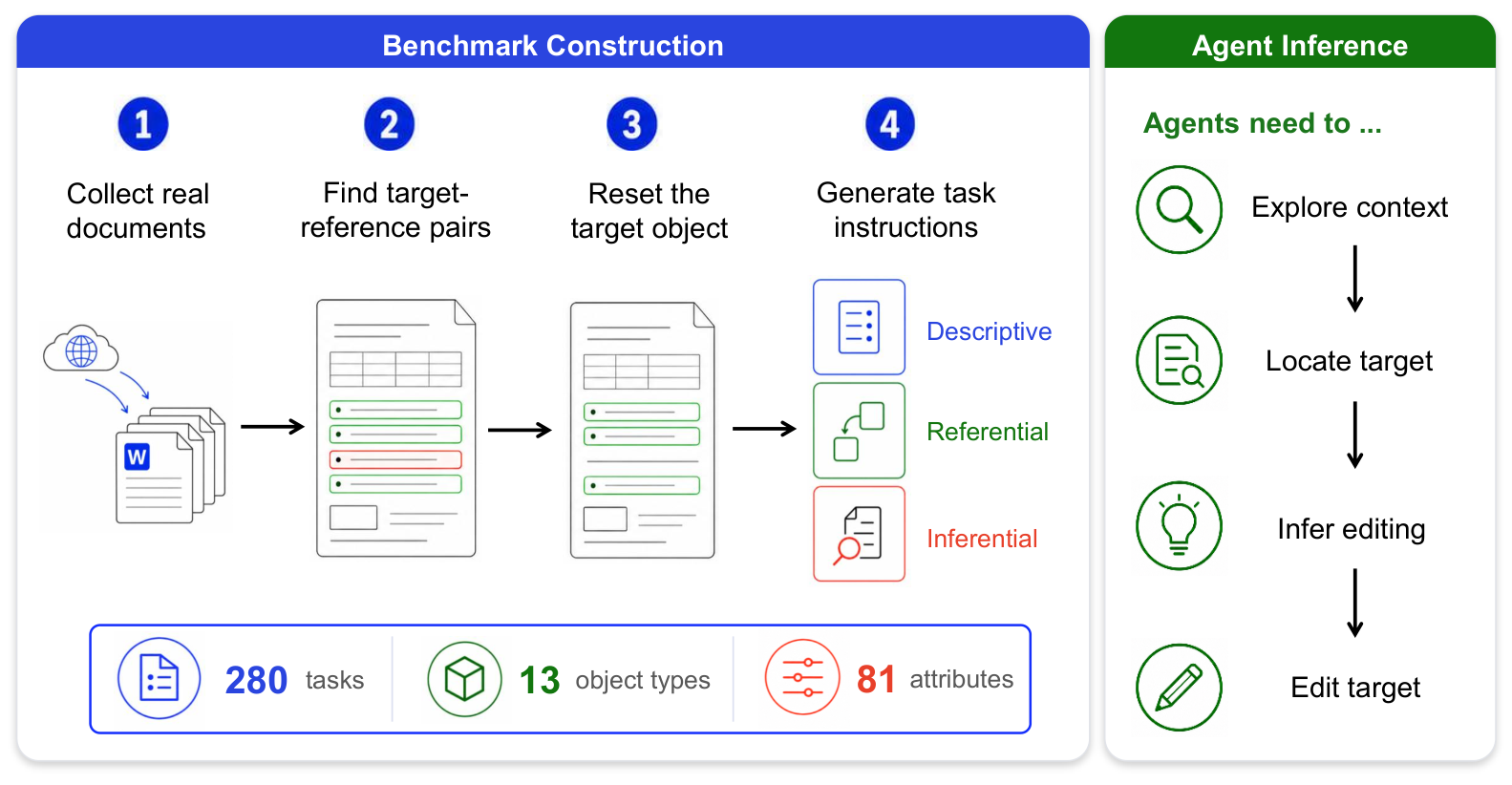
The authors built the benchmark from 280 real Word documents harvested from the Common Crawl dataset. For each document they identified an object—such as a paragraph, table, header, or shape—with a set of formatting attributes that also appeared on at least one other same‑type object in the file. They then reset the target object's attributes to their defaults, creating an input document, while preserving the original attributes as ground truth. Each base instance is paired with three instruction variants:
- Descriptive – a full list of attribute changes (e.g., “set font to Times New Roman, line spacing to 1.5”).
- Referential – a request to make the target consistent with another exemplar object (e.g., “make picture on page 6 match picture on page 3”).
- Inferential – a prompt that expects the agent to discover both the exemplar and the needed attributes (e.g., “review the document and apply the appropriate change to the header in section 3”).
This design yields 840 instruction‑conditioned tasks covering 13 object types and 81 distinct formatting attributes. Human annotators verified that the intended formatting is unambiguous and recoverable from the in‑document exemplar. Figure 1 shows the construction pipeline and the three instruction conditions.
How do current AI agents perform on the benchmark?
The study evaluated six recent coding‑agent systems—including Claude Code with Opus 4.6, Claude Code with GLM 5.2, Codex with GPT‑5.5, Codex with GPT‑5.4, and Kimi CLI with Kimi K2.6—in sandboxed Windows environments. Even on the fully specified descriptive tasks, the best system (Claude Code with Opus 4.6) achieved only a 62.9% task‑level pass rate. When the instruction required inferential reasoning, performance dropped sharply; the same system passed just 40.7% of the inferential variants. All other agents showed similar gaps, confirming that current models struggle to extract formatting cues from document context.
What challenges does the benchmark highlight?
The authors' failure analysis points to three major sources of error:
- Improper editing methods – agents sometimes corrupted the file or applied changes that had no visible effect.
- Misunderstanding API semantics – many agents selected incorrect parameter values for Word’s automation API, leading to incomplete or wrong attribute updates.
- Limited visual understanding – as illustrated in Figure 4, agents could correctly identify obvious visual attributes like fill color, but missed subtler properties such as line spacing, spacing after, or shadow parameters, which are critical for perfect formatting consistency.
These findings suggest that progress is needed not only in natural‑language understanding but also in precise GUI interaction and visual perception of document layouts.
How can Grafy users explore or apply this research?
Grafy’s Code studio (Grafy Code) lets developers run the same coding‑agent models in a controlled environment, upload a Word document, and script the automation steps required by WordInferBench. By reproducing the benchmark’s descriptive, referential, and inferential prompts, users can directly measure their own agents’ pass rates and experiment with prompt engineering or tool‑use strategies. For a deeper dive into the benchmark’s PDF and the underlying methodology, the Reader app (Grafy Reader) can ingest the arXiv paper, allowing you to ask follow‑up questions and extract specific sections without leaving the workspace.
Frequently asked questions
How many instruction variants does WordInferBench provide per base document?
Each of the 280 base editing instances is paired with three instruction conditions—descriptive, referential, and inferential—resulting in a total of 840 distinct tasks.
Which AI system achieved the highest success rate on inferential tasks?
Claude Code with Opus 4.6 performed best among the six evaluated agents, passing 40.7% of the inferential variants, according to the benchmark results.
Can Grafy’s existing tools run the full WordInferBench evaluation?
Yes. Using Grafy Code you can script the required Word automation, and with Grafy Reader you can load the benchmark documentation for reference. While Grafy does not ship a dedicated benchmark runner, the combination of these apps provides a practical way to replicate and extend the study.
Source: https://arxiv.org/abs/2611.15189
Source: Grafy Research Lab — WordInferBench: Can Agents Infer How to Edit from Word Document Context?
More news

Study Reveals LLM Agents Mostly Browse Instead of Acting in Public‑Service Tasks
Researchers analyzed 2,400 runs of ten LLMs on four public‑service scenarios and found agents read files 97% of the time but only produce useful output.

Coding agents often solve early but keep running, study finds
A new arXiv study shows 38‑82% of AI coding agents produce a correct patch on their first edit but then waste up to 60% of steps before stopping.

guardscope Framework Quantifies Runtime Control Coverage for LLM Agents
A new arXiv study introduces guardscope, a two‑stage framework that measures how many of an LLM agent's action paths are inspected by runtime controls.