One face, every shot: consistent AI characters
Ask an image model for Mara, the marine biologist on Monday and again on Friday and you get two different women. The model has no memory of the face it invented; a name is a text token, not an identity. Every team that has tried to keep a character alive across a campaign knows the workaround — one good picture, dragged by hand into every generation, hoping nobody loses the file or attaches last month's version.
Grafy's Cast library turns that workaround into a system. A cast member is an account-level identity: a name, a description worth drawing from, the register it was designed in, a voice, and an ordered set of reference images — one of which is approved and is the one every generator actually reads. Films, games, Creator edits and scheduled social posts all draw from the same approved face, because they all read the same record.
A character is a record, not a picture
A member starts as fields, and the fields are the point. The name runs to 120 characters. The description runs to 2,000 and should be worth drawing from: build, age, wardrobe, the scar over the eyebrow, the things that must survive from shot to shot. Then a look, a voice, a preferred sheet kind, and up to eight reference images, of which exactly one carries the approval.
The record is account-level, not project-level, and that is the design decision the whole feature rests on. Grafy had already built per-project character sheets twice — once for films, once for games — and neither survived the project it was made in, so a face designed for a documentary could not appear in a game, an advert, or the next documentary. The library is the layer both of those became clients of. An account holds up to 200 live members; archiving one takes it out of every picker, and out of that count, without deleting its history.
Six looks, because a drawing is not a photograph
Every member carries one of six looks: Photoreal, Cinematic, Anime, Illustration, 3D render or Comic. The look records the register the face was designed in, and the practical thing a consumer needs from it is binary: is this reference a photograph or a drawing? That decides whether it can be dropped into a shot untouched or has to be restyled first.
What a look deliberately is not is a mood. Each entry names a genuinely different kind of picture, and the list is kept short on purpose — brooding belongs in the description, where it can be specific about this person instead of generic about the medium.
The reference sheet is what holds a face together
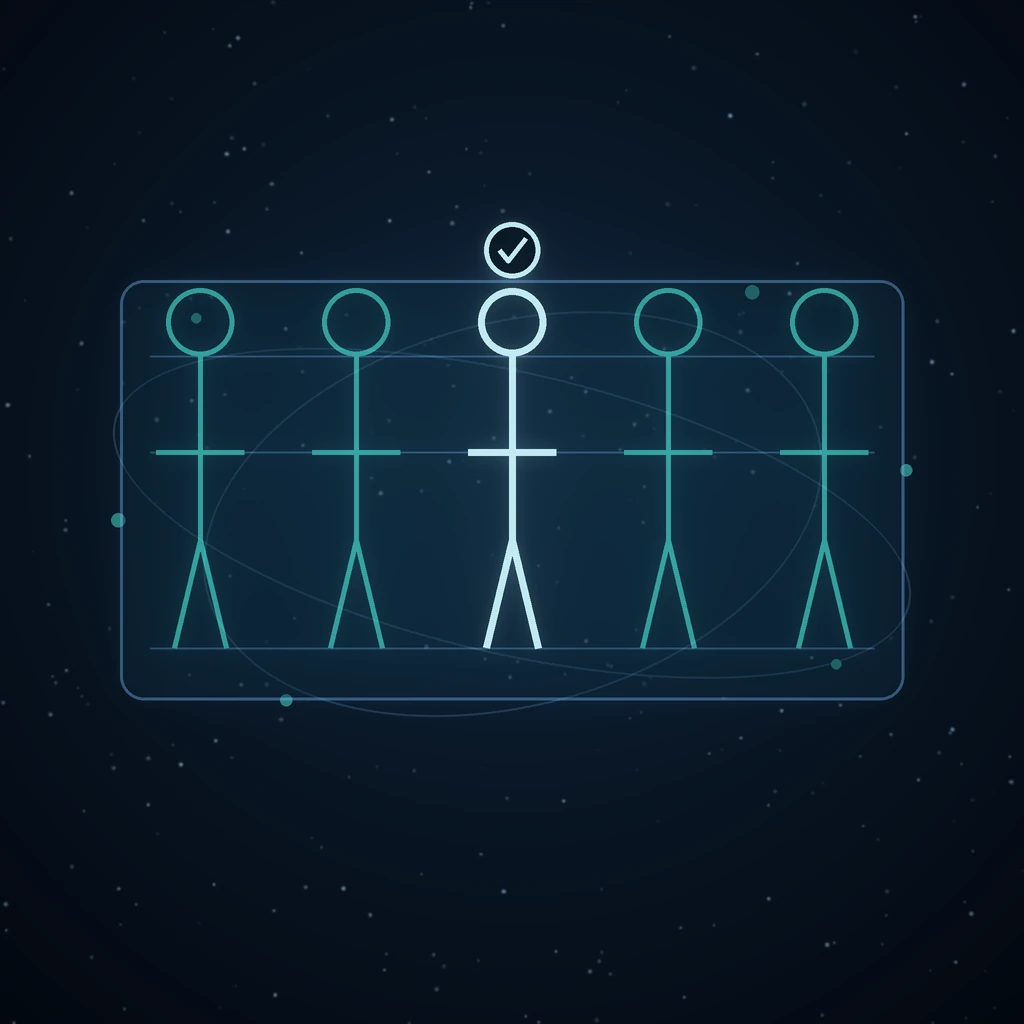
A generative model copies what it is shown far more faithfully than what it is told, so the real product of the Cast library is the reference sheet. There are four kinds. The default is the turnaround: the same character drawn five times across one sheet — front, three-quarter, side, three-quarter back and back — at identical height and scale, feet on a shared baseline, under flat light. It is the strongest identity lock of the four because it pins the face from several angles at once, and the shots a member will actually be used in are not all frontal. An expression grid suits characters who carry emotional beats; costume variants suit one seen across years or seasons; a single portrait is the cheapest and is enough for someone seen briefly and only from the front.
Every sheet, whatever its kind, obeys the same rules: one character only, no text, no labels, no watermark, no background scenery. A reference image is a tool, not a picture — anything decorative in it, a rim light or a busy set, is copied into every shot that references it.
Start from words or from a photograph
With nothing to work from, the description becomes the sheet prompt. But you can also hand the library your own photo. A supplied photograph is stored under its own role — source — kept apart from the sheets the model drew, and a re-render prefers the photograph, because redrawing a drawing five times drifts five generations away from the person who was actually photographed.
Re-rendering takes an instruction, too: make him older, grey the beard over the existing sheet or the original photo. The instruction leads, since it is the change being asked for, but the sheet rules follow it — an edit that quietly dropped the multi-view layout would stop being a reference.
Either way, a fresh render is attached to the member but not approved unless you say so. A bad render that silently became the approved face would poison every generation made after it, so approval is its own deliberate act. Managing the cast — creating, describing, archiving — costs nothing; rendering a sheet is the one act that costs credits, priced like the image generation it is. And if a render lands when the member's reference list is already full, the image is still in your asset library and already paid for — the error says where it went instead of pretending the render failed.
What a generation is actually handed
Attach a member to a generation and the server, not the page, decides what the model sees: the approved sheet first, then the remaining references in their stored order, de-duplicated, and truncated to three. Three is a budget, not a shortcoming. Every extra reference pulls the result toward an average of the set; past a handful they stop adding identity and start adding mush.
The prompt then names the attachments. With one member it says the attached reference is Mara, keep this exact face. With two it counts them out in the same order the images are attached — reference image one is this person, reference image two is that one — because references arrive at a model as an unlabelled list, and with two faces attached an unlabelled list gets blended into one averaged stranger. Your own prompt stays first, so the picture is about the scene rather than about the cast. It is the same discipline multi-reference editing applies to sources: images carry appearance, words assign the roles.
Where a member can be cast
Creator and the graph attach members through the shared cast picker — the one who is in this? dialog every surface loads, so there is exactly one way to read the library. Film Studio links a film character to a library member, and every shot they appear in is then drawn from the library's approved reference instead of the project's own sheet: the same face in this film, the next one, and the advert in between. Only the approved image travels, never the supporting angles — a scene with two characters attaches one sheet each, and a second image for the first of them would shift the prompt's naming onto the wrong faces.
Game Studio does the same for a playable game's entities: a sprite or a mesh is built from the one canonical view, because handing the model three views would average them. And Social Studio can run a whole campaign as a member — a persona whose face fronts every generated post. A campaign reads the member fresh on every run, deliberately without a version snapshot: a film someone has already cut must not change under them, but a campaign has no cut past, and its next post should show the face as it is now. That is what makes an on-brand posting pipeline survivable week after week.
Projects notice when the library moves on
Films and games record the member's sheet version at the moment they link. Approve a new sheet later and those projects report drift — the library has moved on since you cast this part — instead of silently redrawing scenes under a cut you already approved. Only a newer version counts as drift; a member restored from backup with a lower number is not a change anyone made, and reporting it would send someone hunting for one.
Put a member into a photograph that already exists
The library can also work backwards: take a photograph the account already has and make the person in it be a cast member. Swap has three modes — replace the whole person, replace only the face, or add the member to a scene they were never in, removing nobody.
The mechanism is a multi-image edit, not an inpaint, and the distinction is the feature. A masked inpaint regenerates a region from a text description; it has no way to be handed a face, so asked to put a named person into a marked box it produces a plausible stranger, every time — and the failure is invisible until someone who knows the character sees it. Instead the photograph and the member's approved references go into the same call, and the prompt says which image is which, who is arriving, who is leaving, and — the part that decides whether the result looks like a photograph or a collage — everything that must survive untouched.
A voice is part of the identity
A member also carries one of four voice presets — Neutral, Warm, Bright, Deep — chosen because each maps onto a real voice in every provider and every language the studio offers, so a member cannot be set up with a voice that silently falls back to something else halfway through a film. The card shows whether a preset is a man or a woman rather than leaving it to be inferred from the word Deep, and every preview reads the same fixed line, because comparing voices only works when they all say the same words.
Compared with the usual workarounds
Retyping the description into every prompt is the cheapest habit and the weakest: a paragraph about a jawline is poor identity evidence next to a photograph, and the paste drifts a little every time. A folder of good outputs is better but has no canon — nobody agreed which picture is the character, nothing orders them, and nothing names the faces when two are attached. Per-project references are exactly what the film and game studios had before the library existed, and their limit is in the name: the face dies with the project. The cast member is the durable version of all three — one approved canon, a served order, and names wired into the prompt — the same reasoning that makes a graph beat a chat thread for work you intend to keep.
Frequently asked questions
How do I keep an AI character consistent across images?
Stop describing the character and start referencing them. Create a cast member, render a reference sheet — the five-view turnaround is the strongest lock — and approve it. Every generation the member is attached to receives that approved sheet and a prompt that names it, which is what holds a face together across forty shots; a text description alone will drift within three.
How many reference images does a cast member need?
A member stores up to eight, but a single generation is handed at most three: the approved sheet first, then supporting angles in their stored order. The budget is deliberate — every extra reference pulls the output toward an average of the set. One well-made turnaround outperforms six assorted portraits, because it pins the face from several angles in a single image.
Can I build a character from a real photograph?
Yes. Attach your photo and it is stored under the source role, kept apart from the sheets the model draws. Sheet renders and re-renders prefer the photograph over redrawing an earlier drawing, so the identity stays anchored to the person who was actually photographed. The rendered sheet still needs your explicit approval before any generator will use it.
What happens to my film if I redesign a character later?
Nothing silent. The film recorded the member's sheet version when you linked the part, so approving a new face makes the project report drift rather than redrawing finished scenes under you. You decide whether to re-link and re-render. Social campaigns are the deliberate exception — a persona reads the library fresh so the next post shows the face as it is now.
What does Cast cost?
The library is part of the Max plan — a door, not a surcharge, since generation pricing does not change and designing a one-off face in Creator stays available on every plan. Inside it, creating, editing, approving and archiving members is free; the only act that costs credits is rendering a sheet, which is priced like the image generation it is.
Open Cast, describe one character properly, render the turnaround and approve it — then stop re-describing a face the library can simply hand to every app you use.
Read next
More from the Grafy blog.

Deep research from one link: a cited report on the graph
Give Grafy a question and one starting link. It crawls the pages that matter, writes a report that cites every claim by number, and files it as a node.

Two AI hosts, one topic: a podcast from your own notes
Grafy writes a two-host conversation on any topic, grounds it on the note you have selected, voices each host in its own preset and saves one audio node.

How to Compress GLB Files for Web and AR
Compress GLB files for web and AR: reduce mesh complexity, understand texture limits, compare the result, and test loading and appearance on real devices.