Adobe Max 2026: explore photos in 3D, interview AI characters
Adobe's latest Max 'sneaks' turn flat photos into explorable 3D scenes, let you interview AI characters, remix audio and copy edits. Here's what they do.
 Source: The Verge — AI
Adobe used its annual Max conference to unveil four experimental AI tools that could change how people build characters, explore photos, design sound and retouch images, according to The Verge. Shown as early previews rather than finished products, they point toward creative software you direct by talking and dragging, not only by typing prompts.
What did Adobe show at Max 2026?
Adobe's Max conference is where the company previews experimental features it calls "sneaks," and this year's lineup leans heavily on generative AI, according to The Verge. Four projects stood out. Project Screen Test designs AI characters by letting you talk with them. Project Sight Span turns flat images into explorable 3D scenes. Project Sound Bender is an AI audio-mixing tool, and Project Rinse Repeat copies photo edits and reapplies them to other subjects. The Verge reports that these are early technical previews of features that could eventually reach Adobe's Creative Cloud apps or its Firefly platform, though there is no guarantee they will ship. A common thread, The Verge notes, is turning complex editing, filmmaking and audio-mixing tasks into something more interactive and approachable.
How does Project Screen Test let you interview an AI character?
Screen Test is designed to make AI-generated characters easier to develop and use for video content, according to The Verge. Rather than describing a character only through text prompts, it lets you talk to it in an audition-like setting. You start with a few base traits — the report's example is "anxious, shy, awkward" — and give the character a voice by picking a preset, describing the voice in words, or uploading sample audio for the character to imitate. You then converse with it, as if on a video call, to flesh out its backstory, temperament, goals, flaws, fears and movement quirks. A Personality tab lets you manually adjust any trait the tool generated. Once you are happy, you can produce animated screen tests, placing the character in an environment or scenario you describe. The Verge's reporter found the results more consistent and identifiable than many "soulless" AI characters, while noting the tool is currently a standalone creative exercise and that it is unclear how, or whether, it will feed into Adobe's existing AI video tools.
What do Sight Span, Sound Bender and Rinse Repeat do?
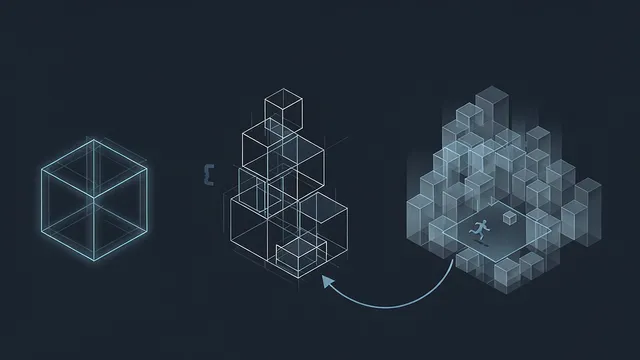
Project Sight Span reframes a photo by turning it into a 3D environment you can move through and reposition, generating objects and backgrounds that lie beyond the original frame, according to The Verge. You can move the virtual camera further than ordinary reframing allows, and even change the shooting position completely. The 3D view looks pixelated while you move, but the resolution is restored once you settle on an angle. It works with any flat image — photos, paintings, illustrations — and preserves artistic styles; even repositioned tattoos and facial features stay recognizable. The Verge likens it to Apple's Spatial Reframing "on steroids," adding that the result feels "far less deserving of being called a photo."
Project Sound Bender is an AI mixing tool. You upload a video clip, describe the audio you want — the report's example is "bubbling sci-fi cauldron noises" — and it generates sound effects synced to the footage. A square canvas assigns a different generated sound to each corner, such as gurgling bubbles, boiling rocks or crackling electric fire, and dragging your cursor shifts which noises stand out or lets you customize each corner, with the audio updating as you listen.
Project Rinse Repeat copies an edit and applies it to other people or objects in the same photo: airbrushing blemishes from one person and matching the fix across a group, or adding shadows to products of different shapes and sizes. It is built on Photoshop, and because the tool rebuilds each change with Photoshop's own tools, the edits applied to other subjects remain fully editable.
Will these experiments become real Adobe features?
Not guaranteed. According to The Verge, "sneaks" are technology previews, and there is no promise they will graduate into shipping features. But most are built on Adobe's generative AI work, and because AI is now central to the company's growth strategy, The Verge suggests at least some are likely to launch officially. "Making these interactions more intuitive is also about giving experienced creatives more precise control," senior principal Adobe research scientist Gautham Mysore told The Verge, adding that the connection "between creative intent and control is a big part of what we're exploring." The Verge also frames a larger point: some of these features may look like toys, but if they prove useful enough, they could eventually replace some of the tools and stock libraries creative professionals rely on.
How can you explore these ideas in Grafy?
The Adobe projects are not available to try, but Grafy's own apps cover similar ground. Sight Span's photo-to-3D idea is closest to 3D Studio, which generates and edits 3D models. Building a consistent AI character for video, as Screen Test aims to, overlaps with Film Studio for assembling AI films and Creator for generating character images and video from a prompt or a photo. Rinse Repeat's approach to image touch-ups maps loosely to Creator's image generation and editing. For audio, Grafy's Music Studio handles AI music and sound, though it is oriented toward songs rather than the synced spot effects Sound Bender produces, so treat it as a partial match rather than a like-for-like swap.
Frequently asked questions
Does Project Screen Test let you talk with AI-generated characters?
Yes. According to The Verge, Screen Test is built around conversing with an AI character in an audition-like setting. You set base traits and a voice, then talk with the character as if on a video call to develop its backstory, temperament, goals, flaws and fears before generating animated screen tests. A Personality tab lets you fine-tune the generated traits manually.
What does Project Sight Span do to a flat photo?
According to The Verge, Sight Span turns a flat image into a 3D environment you can navigate and reposition, filling in objects and backgrounds beyond the original frame. The view is pixelated while you move and sharpens once you pick an angle. It works on photos, paintings and illustrations, preserves artistic styles, and keeps repositioned details such as tattoos and facial features recognizable.
Will Adobe's Max "sneaks" become real features?
There is no guarantee. The Verge describes the sneaks as technology previews that might eventually reach Creative Cloud or Firefly, with no promise they will ship. However, because most are built on Adobe's generative AI work and AI is central to the company's growth strategy, The Verge says at least some experiments are likely to launch officially.
Source: The Verge — AI — Adobe’s AI experiments let you walk around in photos and interview your characters
More news
Frontier3DBench Tests Whether Coding Agents Build 3D Worlds
Einsia's Frontier3DBench tests whether coding agents can build 3D objects, scenes and working worlds; GPT-6.1-sol led overall. See what it means.

Anthropic launches Claude Fable 5.2, Mythos 5.2, cuts API prices 20%
Anthropic's Claude Fable 5.2 and Mythos 5.2 top several third-party benchmarks and cut API prices 20%. Here's what the effort settings mean for your bill.

Chrome's Modern Web Guidance hits 1.0, adds Firefox and Edge
Chrome released Modern Web Guidance 1.0, giving coding agents expert web best practices, now backed by Firefox and Edge. Here's what changed.